What Your ISP Can Actually See When You Browse the Web
Privacy
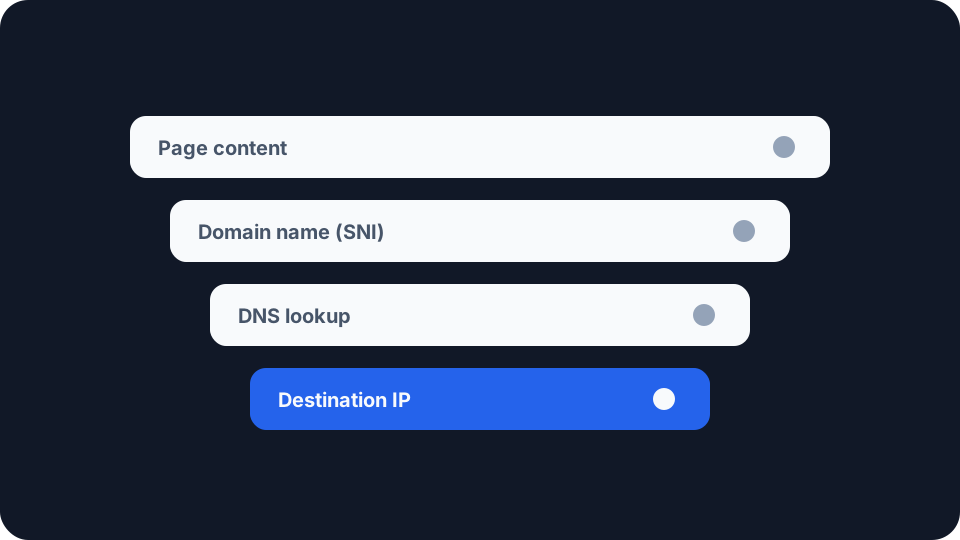
Your internet provider stopped being able to read your traffic years ago. It never stopped being able to see where you were going. Those are two different problems, and only one of them has been solved.
What your ISP actually sees
Every packet you send leaves your home through your provider’s equipment. That position is the whole story. Websites see you one at a time, advertisers see you where their scripts happen to run, but your ISP sits on the path for all of it, every site, every app, every device in the house, all day.
What they can read has shrunk enormously. Google has published an HTTPS transparency report for over a decade, tracking the share of page loads in Chrome that use encryption. It sat somewhere around 30 to 45 per cent in 2015, reached roughly 95 to 99 per cent by 2020, and has largely plateaued there since. Chrome is closing the remaining gap: from version 154 in October 2026, “Always Use Secure Connections” becomes the default, and the browser will ask your permission before loading any public site that still runs on plain HTTP.
The practical effect is that the contents of your browsing are no longer available to the network. Your provider cannot read the article you are on, the messages you send, the terms you search or the form you just submitted. That is a genuine change, and it is worth being clear about, because a lot of writing on this subject still describes a web that stopped existing around 2018.
What is left is metadata. That word does a lot of quiet work, so it is worth spelling out what it actually contains.
The three things that still give you away
Your DNS lookups. Before your browser can connect to anything, it has to turn a name into an address, and that question goes to a resolver. Unless you have changed something, the resolver is the one your router picked up from your provider, and the question travels in plain text. Your ISP does not need to inspect your traffic to know you visited a site, because you asked them for directions first. A resolver log is a timestamped list of every domain a household looked up.
The domain name inside the TLS handshake. Even with encrypted DNS in place, the first message your browser sends to a web server has historically named the site in clear text. That field is called Server Name Indication, and it exists so that one IP address can host thousands of sites and still present the right certificate. The IETF is blunt about the cost. RFC 9849, the specification published in March 2026 for encrypting that handshake, describes the plaintext SNI extension as the field “which leaks the target domain for a given connection”, and calls it “perhaps the most sensitive information left unencrypted in TLS 1.3”.
The destination IP address. This one cannot be encrypted, because it is the part the network reads in order to deliver the packet at all. Whatever else you close off, your provider sees which addresses you exchange data with, when, in what volume and for how long.
That third signal is weaker than it sounds, and the reason is worth knowing. A large share of the web now sits behind shared infrastructure, so a single address may front thousands of unrelated sites. An IP on its own frequently narrows you down to a hosting provider rather than a site. The ambiguity is real, and it is doing more privacy work for you than most people realise.
What encrypted DNS and ECH actually change
Encrypted DNS closes the first channel. DNS over HTTPS and DNS over TLS wrap your lookups so the network cannot read them, and what separates the two matters more than it looks. Both are supported in current browsers and in most modern operating systems. Be clear about what this achieves though: it moves the observer rather than removing one. Your queries stop going to your ISP in the clear and start going to whoever runs the resolver you chose, in a form only they can read. You are picking a different party to trust, which is often a sensible trade, but it is a trade.
Encrypted Client Hello closes the second. ECH encrypts the whole opening handshake message, SNI included, under a key the server publishes in DNS. It spent years as a draft, and in March 2026 it became RFC 9849 on the IETF standards track. Where the browser supports it and the site’s provider has enabled it, the domain you asked for stops being visible on the wire.
It is not a cloak, and the specification says so plainly. In its own words, “ECH is not in itself sufficient to protect the identity of the server”, because “the target domain may also be visible through other channels, such as plaintext client DNS queries or visible server IP addresses”. What ECH gives you is membership of an anonymity set. An observer can tell you connected to a particular provider, but not which of the sites behind it you were after. The size of that set is the size of your protection, which means it varies enormously depending on who hosts the site.
Neither mechanism touches timing or volume. A connection that transfers a certain amount of data at a certain rhythm still looks like what it is, and that is a known limit rather than a fixable bug.
What they are allowed to keep
This is where the common account gets shakiest, so it is worth separating what is technically visible from what is legally required.
In the UK, it is widely repeated that every provider must log every site you visit for twelve months. That is not what the legislation does. Part 4 of the Investigatory Powers Act 2016 does not place a blanket retention duty on all operators. It gives the Secretary of State the power to issue a retention notice to particular operators, and until one is issued, no obligation exists. Where notices do apply, the category in question is Internet Connection Records, which are metadata about which service was contacted and when, not the content of what was sent.
The United States went the other way and did it in one step. In 2017 Congress used the Congressional Review Act to strike down the Federal Communications Commission’s broadband privacy rules before most of them took effect, which removed the requirement that providers get your explicit consent before sharing or selling subscriber data.
The honest summary is that what your particular provider retains, and what it may do with it, is a question about that company and that jurisdiction. It is not something you can read off the protocols, and anyone telling you a single answer that covers every country is guessing.
What you can actually do about it
Turn on encrypted DNS. It is the highest-value change available to most people and it takes a minute in browser or system settings. It closes the channel that gives away the most for the least effort on the observer’s part.
Leave ECH on where you have it. It costs nothing, it is on by default in the browsers that support it, and it helps most on exactly the sites where a shared provider gives you a large anonymity set to hide in.
Consider a VPN if the threat model genuinely fits. A VPN moves the whole picture one hop along, and whether your provider can tell you are using one is a separate question. Your provider sees an encrypted tunnel to one address and stops seeing destinations, and the VPN company sees what your provider used to. That is a real improvement if your concern is your ISP, your employer’s network or a hotel connection, and no improvement at all if your concern is the sites themselves. Our guide to public WiFi risks covers the case where it helps most.
Use Tor for the narrow set of situations that need it. It is slower and it breaks some sites, and for a small number of people that is a price worth paying.
None of this makes you invisible to your provider. It shrinks what they can observe from a detailed record to a coarse one, which for most people is the realistic goal rather than a consolation prize.
Checking what your own connection gives away
Start with what is visible right now. Our my IP address page shows the public address your connection presents and the provider it is attributed to, which is the same identification any site you visit can make. To look at a different address, or to see how an address resolves to an organisation and network, use the IP checker.
If you run a VPN, verify it rather than assuming it. The Network Leak Check reports your visible IPv4 address, ISP and location, and whether a routable public IPv6 address is exposed outside the tunnel, which is a common and quiet failure. It is a scoped check rather than a full multi-resolver DNS audit, and the page says so. For the full before-and-after comparison, check whether your VPN is actually working, and if you want the mechanics of how resolver leaks happen in the first place, what a DNS leak actually is covers them properly.