How DNS Actually Works: Following One Lookup Step by Step
Technical
Type a domain name into your browser and, most of the time, no question travels the length of the internet to answer it. The answer is already held in a cache somewhere between you and the server that owns the record. What follows is what happens on the smaller number of lookups where it is not.
What DNS actually is
DNS is not one database in one place. It is a tree, cut into pieces, with each piece run by whoever owns that part of the name.
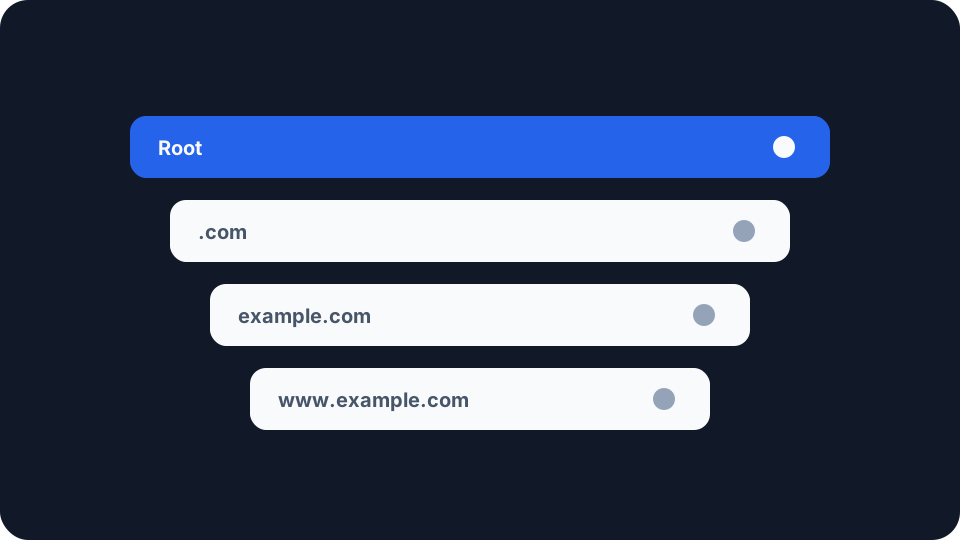
The shape is easier to see if you read a name backwards. In www.example.com the rightmost part is the most general and the leftmost the most specific. RFC 1034, the 1987 document that still defines the concepts, describes labels as being read “from the most specific (lowest, farthest from the root) to the least specific (highest, closest to the root)”. There is also one more label than you can see. The same specification reserves a label with no characters in it at all, and that empty label is the root of the whole tree.
That document describes three moving parts, and the whole system is still those three: the name space with the records hanging off it, the name servers that each hold a piece of it, and the resolvers that go and ask.
All of this describes lookups in one direction, name to address. Going the other way runs on a separate branch of the tree, whose records belong to whoever owns the address block rather than the website, which is why reverse DNS behaves so differently.
Who answers when you ask
Your stub resolver. The small piece of code inside your operating system that your browser talks to. It does almost no work. It knows one thing, the address of a resolver it has been told to use, and it forwards the question there. On a home connection that address usually arrives from your router, which took it from your provider.
The recursive resolver. The one doing the running around, and from a privacy point of view the most important box in the whole diagram. It takes your question, works down the tree until it has an answer, keeps what it learns, and hands the result back. It might belong to your ISP, to a public operator, or to your VPN provider.
The root servers. Thirteen names, a.root-servers.net through m.root-servers.net, run by twelve independent organisations. That thirteen counts names, not machines: the operators’ own published count, dated 24 August 2026, puts the system at 2,004 operational instances worldwide, arranged so the nearest one answers. A root server has never heard of your website. It knows who runs .com.
The top level domain servers. The operator of .com, .uk or .org. Same job one level down, same limitation: it holds a pointer to whoever has the address, not the address itself.
The authoritative servers. The ones that actually hold the record. Whoever runs example.com publishes its records here, and this is the only server in the chain whose answer is the thing itself rather than a signpost.
Following one name all the way down
Assume nothing is cached anywhere, which is rare but makes the sequence visible.
Your browser asks the stub resolver for www.example.com. The stub resolver passes the question to your recursive resolver and waits. From here the recursive resolver is on its own.
It asks a root server. The root does not answer the question, it answers a smaller one, naming the servers for .com. It asks a .com server. That does not answer either, it names the servers for example.com. It asks one of those, and that one is authoritative, so it returns the record.
Notice the pattern. Nobody in that chain except the last one answered what was asked. Each handed back a referral pointing one level closer. That is by design rather than by accident: RFC 1034 states that “the domain system requires implementation of the iterative approach, but allows the recursive approach as an option”. Iterative means answering with a referral and letting the asker carry on. The recursive resolver exists because somebody has to do the carrying on, and that is easier to build once in the middle of the network than into every device on it.
What arrives at the end is an address, which is a smaller thing than people assume. It names a network endpoint and nothing about who sits behind it, the same limit you meet when you look up any IP address and get a provider and a rough region rather than an identity.
Why most lookups never get that far
Every record arrives with a time to live, a number of seconds it may be kept before it has to be asked for again. The design goal behind that is stated in the original specification: where there is a trade-off between the cost of fetching data, the speed of updates and the accuracy of caches, “the source of the data should control the tradeoff”. So the operator of the name, not your device and not your resolver, decides how long an answer stays fresh.
The practical effect is that the full walk down the tree happens rarely. A busy resolver has long since learned who runs .com and will not ask again for a while, and popular records are usually cached already, so the chain above collapses into one question and one answer.
Failures get cached too, which surprises people. RFC 2308, from 1998, made caching the fact that a name does not exist a normal part of resolution. It notes that negative caching “was an optional part of the DNS specification” and then states plainly that it “is no-longer optional”. The countdown on those comes from an odd place. There is no record to carry it, because the whole point is that the record is missing, so the timer travels in the zone’s own SOA record sent alongside the refusal.
This is the real explanation for the delay when you point a domain somewhere new and it works for you but not for a colleague. Nothing is broken. Two resolvers are holding answers of different ages, each counting down its own timer.
What each party learns about you
Every server in that chain sees a question, and a question about a domain name is browsing history in a fairly raw form.
Until recently they all saw the whole thing. A resolver asking a root server about www.example.com would send the full name, even though the root can only usefully reply about .com. RFC 9156, the current standard for query name minimisation, is blunt about why: sending the full name to every server in the chain “was a tradition, not a protocol requirement”. Under minimisation the resolver trims each outgoing question to just one label more than the server it is asking is known to be responsible for. The root is asked about .com. The .com servers are asked about example.com. Neither is told which page you wanted.
That is a real improvement, and it does nothing at all for the part that matters most to you. The same specification says so directly, noting that minimising questions sent to your upstream resolver “does not help in hiding data from the upstream resolver because all information will end up there anyway”. Minimisation protects you from the root and registry operators, who were never the parties with the fullest picture. Your own resolver still receives every name you look up, in full, and it can identify you because you are the one connecting to it.
So the choice of resolver matters more than anything else here, and the same question sits underneath what your ISP can actually see when you browse. If your resolver belongs to your provider, your provider has the list. Routing DNS elsewhere moves that list to somebody with a different relationship to you, which changes who is trusted rather than removing the need to trust anyone.
The failure mode worth knowing about is when you think you have moved it and have not. Traffic can be tunnelled while lookups quietly continue going to the resolver your router handed out, which is what a DNS leak actually is and the most common way this arrangement comes apart.
What you can actually check
Two things here are genuinely within your control, and they are worth separating.
The first is which resolver you use, a settings change on your device, your router or your VPN client, deciding who receives the list of names you ask about. What that change moves, what it leaves exactly where it was and what it can quietly break is set out in changing your DNS resolver. The second is whether your traffic reaches the place you think it does, because a resolver you chose carefully is worth nothing if your requests never arrive there.
Our Network Leak Check is a scoped tool rather than a complete answer to that second question, and the scope is worth stating. It reports the IPv4 address a site sees, the provider that address belongs to, your approximate location, and whether a routable public IPv6 address is exposed outside a tunnel. It does not interrogate which resolver answered your last lookup. What it does catch is an IPv6 path running outside the tunnel while everything else looks correct, which is the case most people never think to check.
Run it once on your usual setup and once with a tunnel connected, and compare. A system this old and this distributed will never hand you one reassuring green tick, but you can find out which parties sit in the chain, and that part was never really hidden.